
Ad Insights Explained
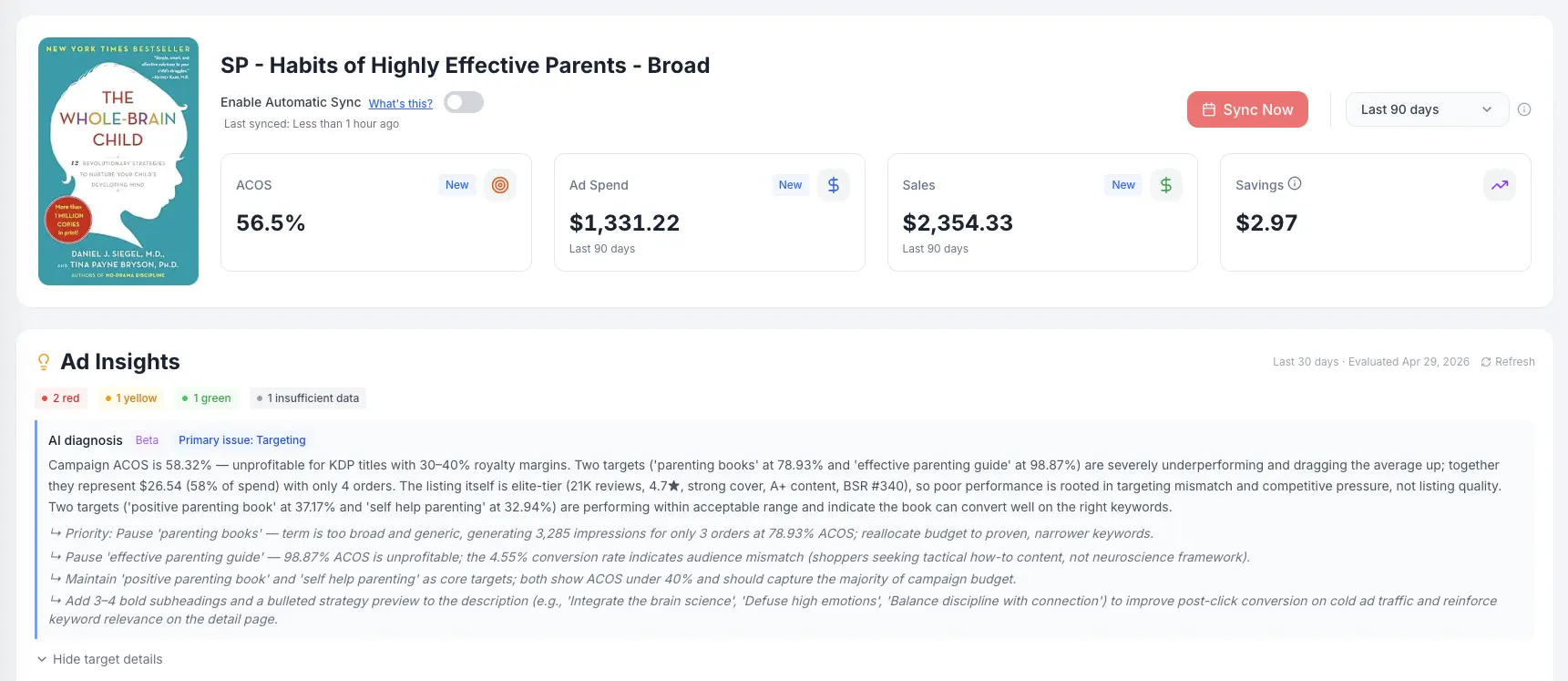
Ad Insights uses AI to review your campaigns and your book's Amazon listing together, so you can tell whether a problem is in your ads or in the book itself. It analyzes your campaigns every week and produces a report that tells you exactly where to focus your attention, no spreadsheet analysis required.
How Ad Insights Works
Every week, BookBidder scans your active campaigns and looks at patterns like spend efficiency, conversion trends, impression volume, click-through rates, and ACoS trajectory.
Each finding is assigned a severity level:
Green: This metric or campaign is performing well. No action required. These confirmations are valuable too since they tell you what's working so you don't accidentally change it.
Yellow: Worth monitoring. Something is trending in a direction that could become a problem, or there's an optimization opportunity worth investigating. Not urgent, but worth a look.
Red: Needs attention. This is actively costing you money, underperforming significantly, or showing a pattern that suggests something is wrong. Prioritize these.
What Ad Insights Flags
Ad Insights covers areas like:
- Campaigns with high spend and no conversions
- Keywords or targets with deteriorating ACoS
- Campaigns with very low impressions (potential visibility problem)
- Ad groups where spend is concentrated on a few underperforming targets
- Marketplaces where performance diverges significantly from your other markets
These checks are tuned for KDP advertising patterns, not generic PPC benchmarks.
Connecting Your Ads to Your Book
Ad Insights also looks at your book's Amazon listing, including the cover thumbnail and reviews. Low click-through or low conversion is often a listing problem rather than an ads problem, so seeing both together helps you decide whether to work on the campaign or on the book.
Where to Find Your Insights
In the app: Navigate to any campaign's detail view to see insights specific to that campaign. You'll see the green/yellow/red flags with explanations of what was detected and suggested next steps.
Weekly email: Every Monday, BookBidder sends a summary of your Ad Insights to your email. This covers your most important flags across all campaigns so you can triage without logging in.
Ad Insights vs. Smart Rules
These are separate systems that complement each other:
Smart Rules take action automatically. They pause keywords, negate search terms, and adjust your campaigns based on rules you define.
Ad Insights observe and report. They analyze your campaigns and tell you what's happening, but they don't make changes. Think of Ad Insights as your analyst and Smart Rules as your assistant.
A good workflow is to use Ad Insights to understand your campaign health, then create or refine Smart Rules based on what the insights reveal.