
Enabling Smart Rules
Smart Rules are BookBidder's automation engine. They let you define conditions (like "keyword spent over $10 with zero orders") and BookBidder automatically applies the action you choose across your campaigns.
Instead of logging into Amazon Ads every few days to manually review and clean up, Smart Rules do it for you on a schedule.
How Smart Rules Work
A Smart Rule has three parts:
Conditions: The "if" statement. What should be true about a keyword, target, or search term for the rule to fire? Examples: "ACoS is above 80%," "Spend is greater than $15," "Orders equals 0," "Lookback period is 14 days."
Scope: Which campaigns and ad groups the rule applies to. You can apply a rule to all campaigns, specific campaigns, or specific ad groups. Smart Rules run on both Sponsored Products and Sponsored Brands campaigns.
Action: What happens when the conditions are met. Options include pausing a keyword or target, adding a search term as a negative keyword, or flagging it for your review.
Setting Up Your First Smart Rule
Here's a practical example most KDP authors should start with:
Rule: Auto-pause keywords with spend but no sales
- Condition: Spend > $8 AND Orders = 0
- Lookback: Last 14 days
- Scope: All Sponsored Products and Sponsored Brands campaigns
- Action: Pause keyword
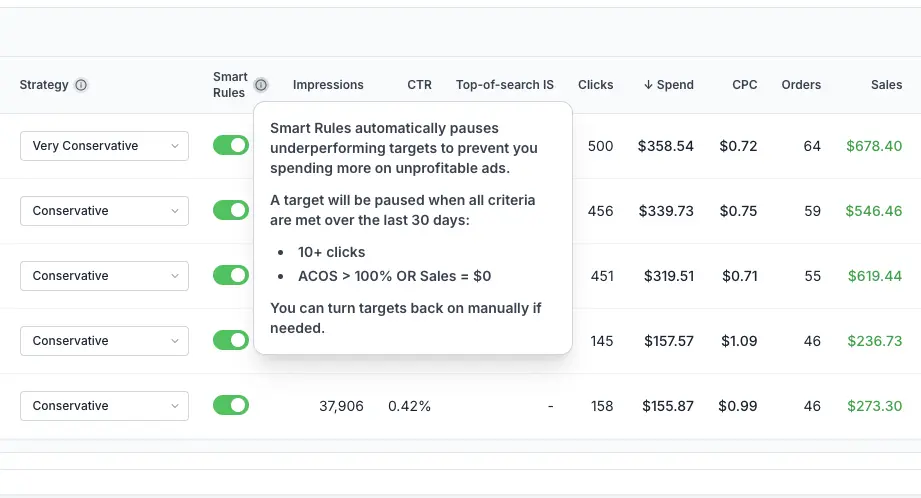
This rule catches keywords burning your budget without generating any book sales. The $8 and 14-day thresholds give keywords enough runway to prove themselves before pausing. Adjust these based on your genre and typical conversion timeline.
Common Smart Rule Patterns
Negate wasteful search terms
Condition: Search term spend > $5 AND Orders = 0 over 14 days. Action: Add as negative exact match. This prevents Amazon from showing your ad for search terms that attract clicks but never convert.
Pause high-ACoS targets
Condition: ACoS > 100% AND Spend > $10 over 30 days. Action: Pause. This catches product targets or keywords where you're spending more on ads than you're earning back in royalties.
Stacking Smart Rules
You can create multiple Smart Rules that work together. For example, a conservative set might include one rule to pause zero-order keywords, another to negate zero-order search terms, and a third to flag high-ACoS keywords for manual review. Each rule runs independently on its own schedule.
Things to Know
- Smart Rules only affect campaigns in their scope. They never touch campaigns you haven't included.
- SP Global campaigns are excluded from Smart Rules since they're managed by Amazon.
- On Sponsored Brands campaigns, Smart Rules pause exact match keywords and specific-ASIN product targets, and negate search terms under broad and phrase match keywords. They never act on category targets.
- Rules run on a regular automated schedule, not in real-time. Check your Smart Rules log to see when rules last ran and what actions they took.
- You can pause or delete a Smart Rule at any time. Pausing a rule stops it from running but preserves its configuration.
- Paused keywords can be reactivated in Amazon's Ads console, and negative keywords can be removed. Smart Rule actions are reversible.